

Home → Services → Website Performance
Performance isn’t a Feature — It’s a Standard
I build and optimize websites that load in seconds, respond instantly, and pass Core Web Vitals with flying colors — all backed by modern frontend best practices. With a focus on Core Web Vitals, runtime responsiveness, and scalable code architecture, I make your site faster, smoother, and ready for growth.
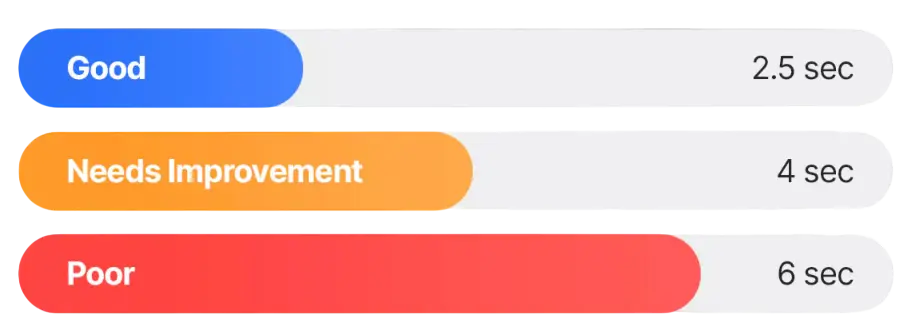
Core Web Vitals Explained
Largest Contentful Paint (LCP)
I reduce load time for key visual content by optimizing above-the-fold rendering, deferring non-critical assets, preloading fonts, compressing hero images, and leveraging modern caching/CDN strategies.

Interaction To Next Paint (INP)
I eliminate long tasks on the main thread by deferring or chunking heavy JavaScript, removing render-blocking scripts, optimizing third-party tools, and using web workers where needed.
Cumulative Layout Shift (CLS)
I ensure elements don’t move unexpectedly during loading by setting image dimensions, avoiding dynamic ads/content injection, and managing fonts and transitions properly.


Why Performance Matters — More Than You Think
A slow website doesn’t just frustrate users — it drives them away. Performance impacts everything: how users interact with your brand, how well you rank on Google, and whether visitors turn into paying customers. Sites that load in under 2 seconds see significantly higher engagement, lower bounce rates, and stronger conversion rates.
Optimizing performance isn’t just a technical task — it’s a business advantage.
Key stats: 53% of users leave if a mobile site takes longer than 3 seconds to load.

What I Improve
Your website might look great—but is it fast, efficient, and user-friendly? I dive deep into performance bottlenecks: from loading speed and responsive design to accessibility and SEO. Let’s turn slow clicks into smooth experiences.
⚡ Core Web Vitals & Load Speed – Optimize for LCP, FID, CLS using Lighthouse, PageSpeed Insights, and real-user metrics to achieve sub-2s load times.
🧵 Main Thread Optimization – Reduce JavaScript execution time, eliminate long tasks, and unblock interactivity with smart script handling.
📦 Asset Efficiency – Minify, compress, and lazy-load images, fonts, and third-party scripts for lean, fast-loading experiences.
📱 Mobile-First Performance – Deliver blazing-fast performance on 3G/4G networks, with responsive design and adaptive content loading.
🧠 Time to Interactive (TTI) – Streamline rendering and load paths so users can engage with your site as quickly as possible.
🧪 Code Splitting & Lazy Loading – Load only what’s needed when it’s needed to reduce initial load weight and improve first paint metrics.
🔄 Runtime Performance – Improve animation smoothness, scroll performance, and input responsiveness with GPU acceleration and minimal DOM reflows.
🔍 Performance Monitoring & CI – Integrate Lighthouse CI, WebPageTest, or custom RUM tools into your deployment pipeline to track regressions and stay fast over time.

Speed matters
I focus on website performance – I create solutions that load instantly, are optimized for Core Web Vitals, and provide users with the best experience. Thanks to modern technologies and proven practices, I guarantee that your website will be fast, secure, and ready for the demands of today’s internet.
My Performance Tech Stack & Workflow
Performance starts with the right tools. I use a modern, proven tech stack—optimized for speed, scalability, and long-term stability. From frontend frameworks to backend solutions, every line of code is chosen with purpose.
🛠️ Lighthouse, WebPageTest, Chrome DevTools
For auditing Core Web Vitals, debugging runtime issues, and benchmarking load performance under real-world conditions.
📦 Next.js, Vite, Webpack
Modern frameworks and bundlers used for code splitting, lazy loading, and optimizing route-level performance.
🖼️ ImageKit, Cloudinary, Squoosh
CDN-backed image delivery and next-gen formats (WebP/AVIF) for responsive, low-latency visual loading.
🧵 React Profiler, Angular DevTools, Performance Tab
Deep diagnostics to identify rendering bottlenecks, memory leaks, and main-thread blocking tasks in real-time.
🧪 Lighthouse CI, GitHub Actions, Playwright
Integrated into CI/CD pipelines for regression detection, automated performance tests, and TTI/CLS tracking with each deployment.
🔍 Google Tag Manager (lightweight setup)
Optimized for async and defer loading to prevent third-party scripts from blocking the main thread.
📊 Real User Monitoring (RUM) – GA4, Hotjar, LogRocket
Track live user experience metrics (TTI, LCP, bounce rate) to ensure performance remains stable under real traffic.
🧹 Tree-shaking, Dead Code Elimination, Code Refactors
Keep JS bundles lean by removing unused modules, rewriting bloated logic, and splitting vendor scripts.
Performance That Drives Business
Modern websites demand more than just beautiful interfaces — they need to be fast, stable, and reliable. I focus on real performance outcomes that improve user experience, SEO, and revenue. These numbers reflect the kind of impact I deliver when optimizing for speed, scalability, and responsiveness.
<100ms
First Input Delay (FID)
I reduce interactivity lag by optimizing main-thread work and script execution. Your users feel immediate responsiveness from the first tap or click — no delays.
+42%
Improvement in Time to Interactive (TTI)
By deferring non-critical JavaScript and streamlining page rendering, I dramatically speed up the moment your site becomes fully usable.
99.9%
Uptime Stability
With performance-focused deployment pipelines, caching, and CDN integration, I help teams build stable, fast-loading experiences that scale under traffic spikes.
<2.0s
Largest Contentful Paint (LCP)
I optimize above-the-fold rendering, preload assets, and compress media to consistently deliver your most important content in under 2 seconds.
FAQ
What is website performance and why does it matter?
Website performance refers to how quickly your site loads, becomes interactive, and responds to user input. Faster sites improve user experience, boost SEO rankings, and directly increase conversions and revenue.
What metrics do you focus on when improving performance?
I focus on Core Web Vitals — LCP (Largest Contentful Paint), FID (First Input Delay), CLS (Cumulative Layout Shift) — as well as TTI (Time to Interactive), TBT (Total Blocking Time), and overall load time.
Can you improve performance without changing the design?
Yes. I can improve load time, interactivity, and rendering efficiency under the hood — through code optimization, asset management, lazy loading, and script refactoring — while keeping the UI untouched.
How do performance improvements affect SEO?
Page speed is a direct ranking factor. Google prioritizes fast, user-friendly sites in search results. Performance optimization can lead to better indexing, higher page rank, and more organic traffic.
Do you support both mobile and desktop performance?
Absolutely. I use mobile-first principles and test performance across devices and network types. Mobile users often face slower connections, so optimization is even more critical there.
What kind of performance improvements can I expect?
Clients often see 30–70% faster load times, better Lighthouse scores, improved SEO visibility, and lower bounce rates. I always deliver before/after benchmarks to show tangible results.
Will my analytics or third-party tools slow down my site?
They can. I audit all third-party scripts and defer or load them asynchronously where possible. This reduces main-thread blocking and speeds up the first meaningful paint.
What tools and techniques do you use to improve performance?
I use Lighthouse, Chrome DevTools, WebPageTest, lazy loading, image/CDN optimization, JavaScript/code splitting, and modern frameworks like Next.js to deliver faster, smoother websites.
Do you offer long-term performance monitoring?
Yes. I offer ongoing support that includes performance tracking, regressions alerts, Lighthouse CI integration, and periodic audits to keep your site fast over time — even as content and features grow.

Performance Audit & Report

Check real results raport